Skip to content
View in the app

A better way to browse. Learn more.

Ultimate Subaru Message Board

A full-screen app on your home screen with push notifications, badges and more.

To install this app on iOS and iPadOS
  1. Tap the Share icon in Safari
  2. Scroll the menu and tap Add to Home Screen.
  3. Tap Add in the top-right corner.
To install this app on Android
  1. Tap the 3-dot menu (⋮) in the top-right corner of the browser.
  2. Tap Add to Home screen or Install app.
  3. Confirm by tapping Install.

Retro_Angel82

Members
  • Joined

  • Last visited

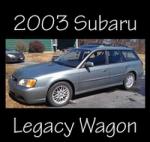
  1. Hi Everyone, I've wanted a Subaru since the late '90s, and earlier this week, I finally got one. It's used, but I bought it through a dealer, and it seemed pretty decent. It's a 2003 Legacy Wagon with 93,000 miles. No rust, that I could see. The timing belt, headgaskets, and waterpump have already been done. I'm absolutely in love with it, but unfortunately, it's already had a problem or two. It's still under warranty, so I got those fixed without a problem. Two alternators and one battery later... things seem to be fine. I do have a question about the transmission, but I'll post that somewhere else. For now, I'm a happy Subie owner.
Account

Navigation

Search

Search

Configure browser push notifications

Chrome (Android)
  1. Tap the lock icon next to the address bar.
  2. Tap Permissions → Notifications.
  3. Adjust your preference.
Chrome (Desktop)
  1. Click the padlock icon in the address bar.
  2. Select Site settings.
  3. Find Notifications and adjust your preference.