Skip to content
View in the app

A better way to browse. Learn more.

Ultimate Subaru Message Board

A full-screen app on your home screen with push notifications, badges and more.

To install this app on iOS and iPadOS
  1. Tap the Share icon in Safari
  2. Scroll the menu and tap Add to Home Screen.
  3. Tap Add in the top-right corner.
To install this app on Android
  1. Tap the 3-dot menu (⋮) in the top-right corner of the browser.
  2. Tap Add to Home screen or Install app.
  3. Confirm by tapping Install.

AndrewDoppel

Members
  • Joined

  • Last visited

Everything posted by AndrewDoppel

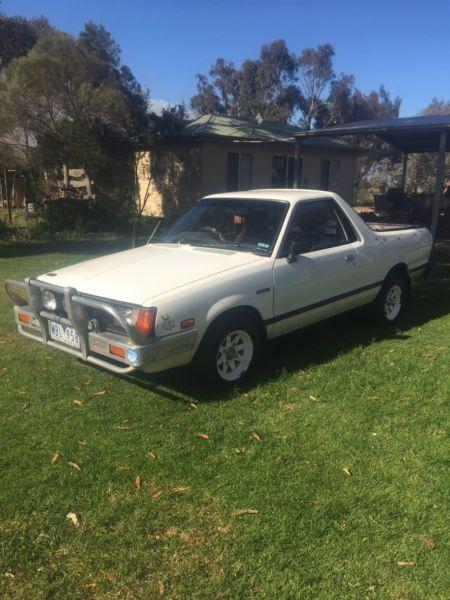
  1. Hi everyone, My name is Andrew and I live in Melbourne, Australia (Down Under!). Together with my wife and son we own four Suby's; 2010 Outback (mine), 2012 XV (wife's), 2007 Impreza (son) and a 1988 Brumby.....or as you guys call them; BRATS, which I am slowly restoring as their numbers here in Oz are becoming increasingly lower but their parts cost is steadily escalating. I have some queries, but I'll ask them in the forums. Thanks to the administrators for the add, I hope this site gives me what I need. I have included a pic of my Brumby from when I bought it. It has been cleaned up considerably since this photo was taken.
Account

Navigation

Search

Search

Configure browser push notifications

Chrome (Android)
  1. Tap the lock icon next to the address bar.
  2. Tap Permissions → Notifications.
  3. Adjust your preference.
Chrome (Desktop)
  1. Click the padlock icon in the address bar.
  2. Select Site settings.
  3. Find Notifications and adjust your preference.