
Skip to content
View in the app

A better way to browse. Learn more.

Ultimate Subaru Message Board

A full-screen app on your home screen with push notifications, badges and more.

To install this app on iOS and iPadOS
  1. Tap the Share icon in Safari
  2. Scroll the menu and tap Add to Home Screen.
  3. Tap Add in the top-right corner.
To install this app on Android
  1. Tap the 3-dot menu (⋮) in the top-right corner of the browser.
  2. Tap Add to Home screen or Install app.
  3. Confirm by tapping Install.

Grim

Members
  • Joined

  • Last visited

Everything posted by Grim

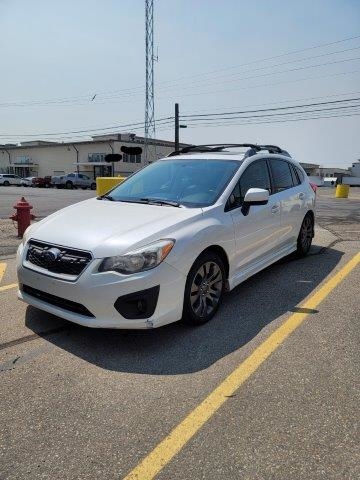
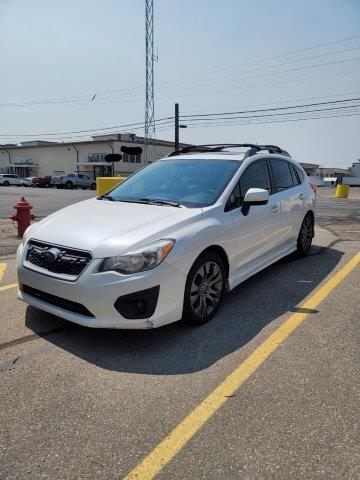
  1. Hello everyone. I am a first time Subaru owner. My entire life, I've only ever owned Fords. I still own a 93 Bronco, but since gas for the Bronco was costing me $240 a month, I figured that was enough for a car payment. I've always liked the Impreza hatchbacks, so I decided to go for it. I just purchased a 2013 Impreza Sport Limited Hatchback. I couldn't spring for a wrx, but I love it anyway. I am big into modding my vehicles and I'm discovering that after market parts for my Subie are damn near non existent.... I'm ready to take on the challenge though. I am glad to have found this forum to help me navigate Subaru ownership! It's all new to me.

Account

Navigation

Search

Search

Configure browser push notifications

Chrome (Android)
  1. Tap the lock icon next to the address bar.
  2. Tap Permissions → Notifications.
  3. Adjust your preference.
Chrome (Desktop)
  1. Click the padlock icon in the address bar.
  2. Select Site settings.
  3. Find Notifications and adjust your preference.