March 3, 201115 yr YAH saw it on highway 18 goin west/south literally after buying a 88 lifted with rebuilt engine, etc etc anyway its tinted windows, an outstanding blue paint job, and think a winch and custom bumpers, he did defintaely have the EJ 22 because he pulled hella on the 1.8 fuel injected and he was lifted with aftermarket rims
March 3, 201115 yr Its Mr. BRAT's here on the forum. http://www.ultimatesubaru.org/forum/album.php?albumid=264&pictureid=2688
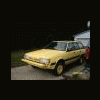
March 5, 201115 yr Author oh nice, quick question, how your rims to clear properly, just put on 15 in 205/75/15's on it and alot clearence probs, has a 2 inch lift and is a gl wagon
March 5, 201115 yr Author think i can put 2 more inches of body blocks without having to drop then engine anymore?
March 6, 201115 yr Author oh i see.. well i just ended up beating on the firewall for a little while and that is no longer an issue

Please sign in to comment
You will be able to leave a comment after signing in
Sign In Now