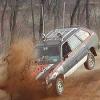
December 24, 201114 yr This was a car that i got for free. It ran the babe rally, then was given to me, and then i ran it in the babe rally as Team TrashWagon FWD 87 GL wagon. I later sold the car, then it was sold again, the owner was referred to me, and i swapped the driveline int a clean 88 wagon and junked this one's body. This car had over 250,000 miles. The last sets of photos are from deals gap. notice how far over the 9 ft whip antenna is bent to get an idea of how hard i was taking those turns. I was drifting the same turns in a 78 toyota camper the following year's babe rally. This car never had a title as it came from NH where a title was not required. I could have titled it in WI if i had NH registration documents, but i could not get them from the original owner. I swapped the dash vin tag and titled it as an 87 gl-10 turbo wagon from my already junked TrashWagon6. I am the one who ultimately junked this car under that title. I have a video of the junking once i capture the tape. Don't tell me i am bad and did a felony because i have gone to jail several times for things far LESS criminal (driving a car) http://www.youtube.com/watch?v=Lrekju5YGjg&feature=mfu_in_order&list=UL

Please sign in to comment
You will be able to leave a comment after signing in
Sign In Now