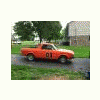
April 30, 201213 yr So I was driving my 78 brat the other night and it just quit. I had lights and wipers, but no starter, cigarette lighter (cb radio), or anything that seems to be switch hot. I took a test light to the switch and fuse box, but only about half the fuses are getting power and the ignition switch isn't getting any. I researched wiring diagrams, but the only one I found is a PDF that is too pixelated to read if you try to zoom in at all, and my chilton's manual won't be in for a few more days. Has this happened to any one or does anyone have or have a link to a useable wiring diagram? Any help will be appreciated and thanks in advance.
May 1, 201213 yr Hey. electrics are not my thing so I can't help with wiring but I have noticed that sometimes my igition barrel sticks a little and causes the same issue that you have. If all your fuses and contacts are good then maybe it wouldn't hurt to squirt some WD40 or whatever down the barrel and make sure its working correctly. Or even bypass ignition barrel to see if it is the cause. Regards Dirk.
May 2, 201213 yr Author By barrel, I assume you mean the back of the switch itself. I'm fairly positive that the problem is before the switch because all the connections that plug into it are dead.

Please sign in to comment
You will be able to leave a comment after signing in
Sign In Now