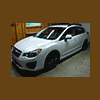
May 2, 201213 yr I just bought a new 2012 Impreza 2.0i Sport Limited last Saturday: Photo I had to order it of course, and it took 2 months to get it. I am really liking it It is my first brand new car. My first vehicle was a '92 Chevy Blazer which I had briefly, before buying a year-old 2001 Pontiac Sunfire SE 4-door, which was my previous car that I owned for nearly 10 years. I was considering the Mazda 3 and Ford Focus hatchbacks before deciding that I wanted AWD. I'm glad I chose the Subaru.
May 2, 201213 yr I would have had to order my Sport limited, as well. They really don't have any in stock at either dealerships in the region over here. However, I didn't want to wait...and I ended up talking myself out of a BRAND new car...but yours sure does look sweet! I'm still happy with my orange/copper 09' Impreza 4-door! =]

Please sign in to comment
You will be able to leave a comment after signing in
Sign In Now