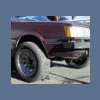
January 24, 201412 yr Drove several hours to pick it up from rural Montana. The guy wanted $500, which was probably a bit much, but I'd driven all that way and didn't wanna go back empty handed. It runs and drives alright, but needs a tuneup, the exhaust is LOUD, and the body is extremely rusted out. I'm not 100% sure, but am assuming it's the DL model as it has two headlights instead of four. And I'm also not sure if this has the 1.6 or 1.8 liter engine, cause when I go to look up parts, it gives me the choice of both. It does have the single-range transfer case, which kinda sucks cause I wanted to throw on some taller tires, so I'm gonna try and track down an ea82 1.8 and dual-range transfer case for a full swap as fuel injection and extra torque would be lovely. The VIN tag on the door says it was manufactured in 11/79, and the VIN is A69L-043500. Does that mean anything to anyone?

Please sign in to comment
You will be able to leave a comment after signing in
Sign In Now