
Leaderboard
-
Subaru Scott
Members1Points610Posts
Popular Content
Showing content with the highest reputation on 07/17/25 in Posts
-
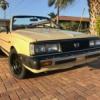
This really disturbs me. That these, and who knows how many other thousands of old parts there are, sitting in Subaru warehouses. With no way for anyone to even begin to find them, unless they have an old parts book. I got these numbers from a guy on facebook, who had such a book, as incredibly ironic as that is... When I bought my 83 ragtop 4 years ago, In February in Indiana, at night, in sub-zero temperatures, the thermostat was stuck wide open. I went to the dealership I had actually worked at in the early 90s for a tstat. The kid at the parts counter was, like, "Uh...like, our system only goes back to like 85." I just glared at him, turned around, and went to Napa. I was too steamed to even discuss why: 1. He had no clue that they were the same as the 85-94s. 2. That Subaru had not bothered to put anything older in their system. I realize they are only required to sell parts for 15 years after manufacture, but why keep these parts in stock then?!? I really see this as a failure of Subaru to support the survivors of their brand. They should be featuring some of our old relics... with the old relics (us) that keep them alive, in their sales propaganda, instead of all the 20-somethings and their dogs camping in brand-new Crosstreks... Forgive my rant.1 point