GuessWho
Members
-
Joined
-
Last visited
-
"Good luck with yours!" -- Very well put. hahah... Its a Pain to keep running, but when it does, Its a blast. (Side Note again: Fixed the Images)
-
"cool welcome, and i have to put in the neccessary plug for www.xt6.net" -- Not quite sure what that means, but thanks and ok? heh side note: Doesnt the car say XT enough? do ya REALLY need a bumper sticker too!? haha "dont see it" -- Just put in some direct URL's aswell incase they dont display correctly.
-
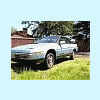
Washed n Waxed it the other day, And decided to share some Pic's I took (photography's a hobby of Mine, and hey, What better to take Pictures of? heh..) Figured I would just re-post in this thread rather then start a new one. Pics: (Click for Large Res Images)
-
Hey. I was actually Searching Google, trying to figure out how to Fix my Drivers side Door (Automatic Window chain busted).. Anyways, I happened upon these forums and decided Id register and say Hello. 1986 Subaru 4wd Turbo XT. Love the car when It runs, Cant stand it when it doesn't... lol... My parents got it Used, and It got handed down to me when I got my License.. Basically we've had to put more and more money into it each year, but its a blast to drive... Anyways, Figured Id stop in and Say hello and Introduce myself.