jonjon11
Members
-
Joined
-
Last visited
-
-
I have a 91 loyale 5 speed and first off I am wondering what motor is in it. it is the 1.8L stock motor. Is that the one you can an ea82? The next question is if I wanted to upgrade to an ej22 that came out of an auto 1990 legacy would it work or not?
-
ok
-
where might I find that?
-
It was in a rear collision with the last owner, maybe it is the hatch. They killed the hatch pretty good, but it still openes and closes.
-
Thank you.
-
Whenever I let my car warm up during the winter or if I leave the care running when I am stationary it smells like exhaust inside. What can I do about it?
-
I thought it was bad to rev them up to 4000 to shift through the gears.
-
ya it has 4wd, what are the shift points, 2500 or 3000? I usually have it going about 45 to 50 mph. I dont drive to much on the highway. My tires could be the problem actually, I have the right size tires, but they are different than the ones I usually see on loyales.
-
I am new to Stickshifts, but I bought a 91 Loyale non-turbo with a 5 speed and every time I talk to someone with one they always tell me that they get about 32 mpg. Maybe it is just me being new to sticks, but I am not getting 32mpg, more like 20 or so. It is mostly in town driving, but I took at trip last week and only got 26 mpg going about 75-80mph. Is there something I am missing? I am not that bad at sticks, I have had it almost a month now.
-
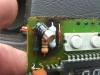
Here we go
-
I dont know how to post pictures in the thread
-
This my what my clock looks like
-
What kind of Subaru is in the second picture?
-
Thank You