newzealandproud
Members
-
Joined
-
Last visited
-
is it normal for an engine that has been sitting for a long time to have low compression ???
-
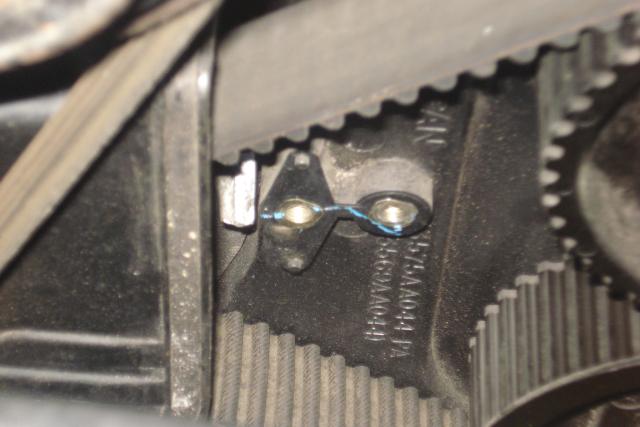
quite possibily. but if you look at the second photo. it is on an oval shaped base and has two little dowels on it
-
yeah 1993 doch, ej20 twin turbo. bg5
-
its a 1993. yeah two holes right next too eachother
-
25 for 0 ?? gotta be a record lol
-
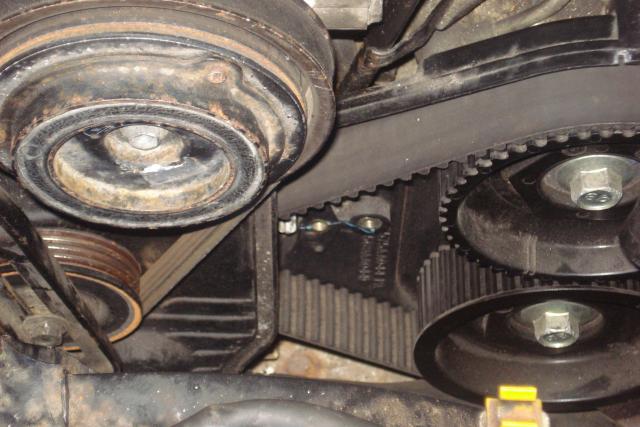
took the timin cover of to check timing and saw this .... what goes here??
-
hey. I have checked codes, and i either have no codes or crank sensor. how do you test crank sensor??
-
ya. i plugged the wires in under the dash and the engine managment light just keeps going long blinks so that is either no codes or crank sensor. I put the crank sensor from my old engine in but nope. no codes
-
it has individal coils on each plug. i tried the coils off the old engine but no go.
-
so. I have no spark so I put a test light on the wires going to my coils, i have power there, it doesnt flash when i crank it though, just stays solid. is my igniter pooched??
-
hello, does the igniter have a fuse at all??
-
nahh i dont have one of those, i have individual ones on each plug. pulled one off but had bugger all spark. dont suppose you have any idea why??
-
im missing it lol. the wires go into looms, is it on top of the engine or the manifold?? what does it look like?
-
im a tool i know, new at this. sorry guys
-
1993 gt legacy EJ20 BG5 i have a photo of it but dont how to upload them