kjalbert
Members
-
Joined
-
Last visited
-
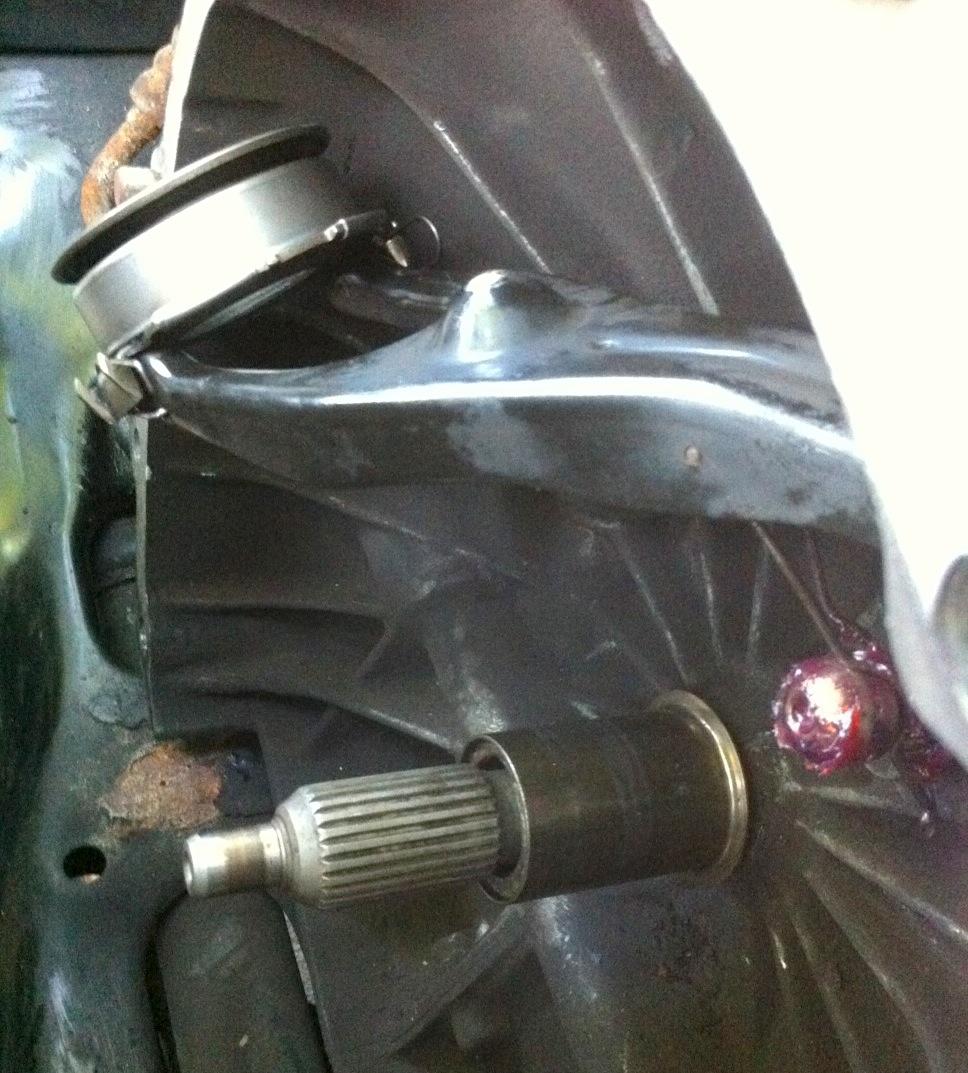
kjalbert replied to kjalbert's topic in 1990 to Present Legacy, Impreza, Outback, Forester, Baja, WRX&WrxSTI, SVXYes, that makes sense. Problem is, how do I figure out if this is one of the high-end kits or a cheap press-on sleeve? This is the first one I've seen so I don't have much to go on. Here's a photo of the shaft with the sleeve installed...
-
Hi folks, I'm in the middle of a clutch job on my 2002 Outback EJ25.1 - also doing head gaskets, timing belt, water pump, etc. Just purchased the vehicle a few weeks ago from a private seller and making sure everything is tight for winter. Anyway, back to the clutch. It turns out that the new throwout bearing that came with my Exedy kit doesn't match the old one. The diameter on the new bearing is too small for the shaft. After some research I realized that the existing bearing was installed along with one of these snout repair kits (http://www.subaruwrxparts.com/shop/pc/viewPrd.asp?idproduct=1793&idcategory=0). Unfortunately, this car needs to get on the road ASAP and I don't have time to wait for a snout kit to come in the mail. So my question is: should I pull out the snout kit and old throwout bearing and use the new one without the sleeve? Or keep the sleeve and old bearing in place and reassemble with the rest of the new clutch kit parts? The old bearing seems to be in decent shape. I'm just wondering which will be worse - using the old bearing, or using the new bearing without the sleeve kit. By the way, I can't say enough about how seriously amazing this forum is. This is my first post so hopefully I can add something to the pile of knowledge here!