Skip to content
View in the app

A better way to browse. Learn more.

Ultimate Subaru Message Board

A full-screen app on your home screen with push notifications, badges and more.

To install this app on iOS and iPadOS
  1. Tap the Share icon in Safari
  2. Scroll the menu and tap Add to Home Screen.
  3. Tap Add in the top-right corner.
To install this app on Android
  1. Tap the 3-dot menu (⋮) in the top-right corner of the browser.
  2. Tap Add to Home screen or Install app.
  3. Confirm by tapping Install.

kmicic

Members
  • Joined

  • Last visited

Everything posted by kmicic

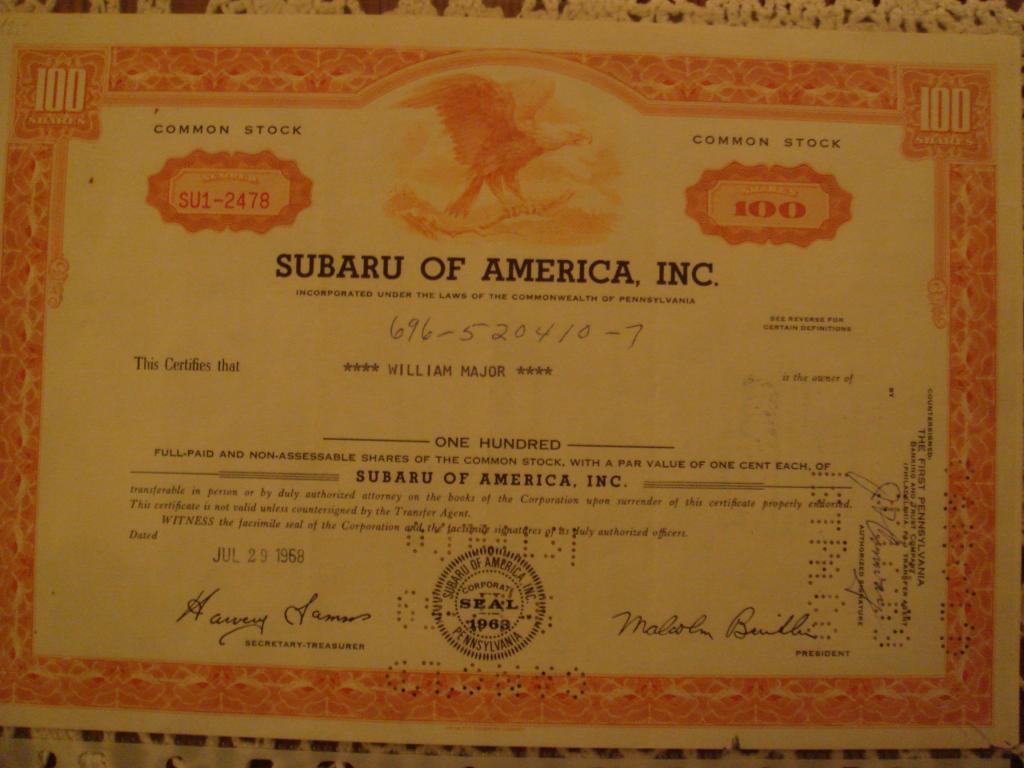
  1. Not really sure if this is a good forum, but here is a piece of history I have come across recently. This is the year Subaru debuted in the USA. As far as my googling skills allow, this is the only image of Subaru stock certificate on the internet, regardless of year. You can't even buy Subaru USA stock anymore, have to go to Nikkei for Subaru Enterprise global stock (not to mention, no company issues certificates like this anymore). If anyone can can pitch in with more details, I'd appreciate it, since the info on history of Subaru in the USA is pretty skimpy.
Account

Navigation

Search

Search

Configure browser push notifications

Chrome (Android)
  1. Tap the lock icon next to the address bar.
  2. Tap Permissions → Notifications.
  3. Adjust your preference.
Chrome (Desktop)
  1. Click the padlock icon in the address bar.
  2. Select Site settings.
  3. Find Notifications and adjust your preference.
