Skip to content
View in the app

A better way to browse. Learn more.

Ultimate Subaru Message Board

A full-screen app on your home screen with push notifications, badges and more.

To install this app on iOS and iPadOS
  1. Tap the Share icon in Safari
  2. Scroll the menu and tap Add to Home Screen.
  3. Tap Add in the top-right corner.
To install this app on Android
  1. Tap the 3-dot menu (⋮) in the top-right corner of the browser.
  2. Tap Add to Home screen or Install app.
  3. Confirm by tapping Install.

dj voicy

Members
  • Joined

  • Last visited

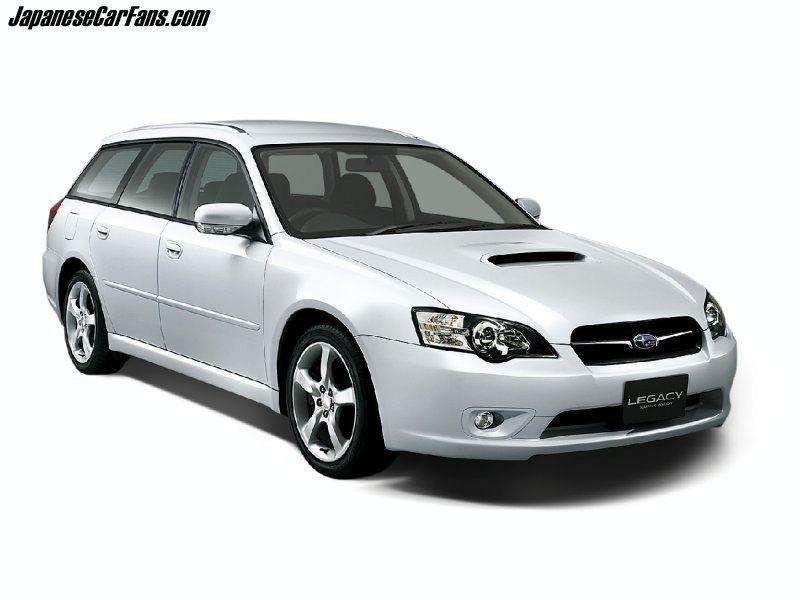
  1. Am Kevin and am very much interested with more information about the 2006 Subaru Legacy Touring Wagon 2.0 5AT and I don’t have much information about its features and I have with me the chasis number . Being (BP5 – xxxxx) 2000cc , automatic ,and i asked from the seller and he told me its NON-TURBO, becouse would like to check on its fuel efficiency, it’s a japan pre owned model. If you can provide to me any PDF copy or links about this exact model,specifications it will be very much appreciated Thank you

Account

Navigation

Search

Search

Configure browser push notifications

Chrome (Android)
  1. Tap the lock icon next to the address bar.
  2. Tap Permissions → Notifications.
  3. Adjust your preference.
Chrome (Desktop)
  1. Click the padlock icon in the address bar.
  2. Select Site settings.
  3. Find Notifications and adjust your preference.