Beatrice
Members
-
Joined
-
Last visited
-
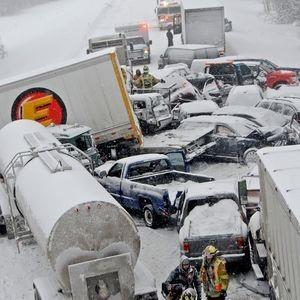
Beatrice replied to Beatrice's topic in 1990 to Present Legacy, Impreza, Outback, Forester, Baja, WRX&WrxSTI, SVXOh, I didn't mean that we need to use salt specifically (didn't even know there's another option), but that we need to keep the roads clear somehow. I wish salt wasn't used around here. :/ Here's a photo of a 75 car pile up we had near here this February. That was just an inch of snow... Between that and the number of times I almost went off the road in my old Sienna this last winter, I want a Subaru!

-
Beatrice replied to Beatrice's topic in 1990 to Present Legacy, Impreza, Outback, Forester, Baja, WRX&WrxSTI, SVXThanks for the feedback. Yes, Maine uses tons of salt on the roads (nobody could get anywhere for much of the winter otherwise- even with salt it can be challenging). We will check it for rust and the idlers/oil changes- as I said in the first post, we will get it checked by a mechanic before buying it, too.
-
Hi. I'm hoping to get some insight about whether this car is potentially a good buy, reliable, etc. We would absolutely get it checked by a mechanic before buying it, but don't want to waste the money on that if it's probably junk. We are near the coast of Maine, it's being sold by a private party. We would love to get a newer car, but just don't have the money, and our Sienna is teetering on its last legs. 2000 Outback, 4 cyl., 179,000 mi, new battery, exhaust, water pump, timing belts and axle, as is $1,100.00 Wasn't able to look for rust or check it over at all. TIA