AustinV
Members
-
Joined
-
Last visited
-
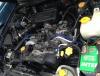
AustinV replied to AustinV's topic in 1990 to Present Legacy, Impreza, Outback, Forester, Baja, WRX&WrxSTI, SVXhere is the 99 engine
-
AustinV replied to AustinV's topic in 1990 to Present Legacy, Impreza, Outback, Forester, Baja, WRX&WrxSTI, SVXI got the VIN from the owner and looked up the info of the motor that way. That's the only way I have any info on the 99, I am going to look at it today or tomorrow, if I can have the owner send me a pic beforehand I will post it. That is great news if the info is correct. I appreciate your help.
-
I have tried finding a forum that already has my answer but I have not had any luck, here is my story- Bought a 96 Outback Legacy few years back, very next day an engine rod popped and I got the engine replaced. A year later I crashed it and totaled the body but the engine was untouched. Now I have some money I am looking at buying a 99 Outback Legacy that has a knocking engine. I am looking to do an engine swap with my engine. I have about a 7th grade level when it comes to knowledge of cars so of course I am not doing this myself, but am looking for some advice. Whether these engines are even compatible, both are 2.5L H4 DOHC 16V or if this is even a good idea or worth the money. The person I am buying the car from is unaware if the car is a single or dual CAM, again any advice would be awesome! Lets bring my Subaru back from the grave! My VIN-4S3BG6854T7980786 The car I am buying VIN-4S3BG6850W7617339