chumleigh
Members
-
Joined
-
Last visited
-
chumleigh replied to chumleigh's topic in 1990 to Present Legacy, Impreza, Outback, Forester, Baja, WRX&WrxSTI, SVXThanks to both of you! I was afraid it was spot welded. I was outside removing the radiators and other stuff after this was posted and have the replacement for it, both lights, bumper, etc and the car I got em off of is still there at the junkyard. Doesn't look like the airbags have any hookup which is what I kind of figured when I bought it. Luckily stuff was just barely touching the pulley wheels so none of that stuff looks damaged. Back to the junkyard (and I live on an island so it's an hours trip to the mainland) but there's good Mexican Restaurant nearby. Thanks again; at least I can proceed now.
-
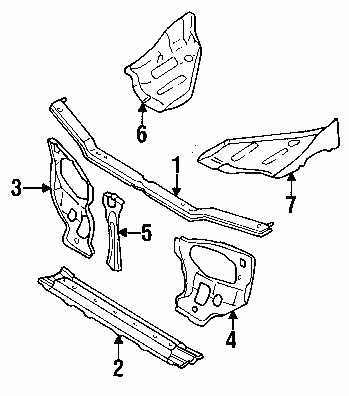
701 Rear ended a car (Forgiveness Please) and crunched in the front end of my 95 Legacy Wagon. Been trying to find how to REMOVE the radiator support assembly. A parts warehouse diagram shows it as top bar, middle bar, and lower bar plus the covers on either side where the headlights go. The top middle and bottom seem to be all of one piece and I can't tell where to separate it from the fenders and rest of the car. I've got the bumper assembly off. The radiator support assembly pushed the radiator up against the pulley wheels. I managed to pull it back out with a come along fastened to a tree. I can get the radiator out now but am baffled (I'm easily baffled) on how the support assembly is attached. Obsequious thanks in advance! I also know how to spell assembly but the edit function won't let me correct the title. 715
-
694 just introducing myself; it's only proper etiquette. I will no high tail it to my my proper place to obsequiously ask for help. Looks like a great and useful site. THANKS!