Skip to content
View in the app

A better way to browse. Learn more.

Ultimate Subaru Message Board

A full-screen app on your home screen with push notifications, badges and more.

To install this app on iOS and iPadOS
  1. Tap the Share icon in Safari
  2. Scroll the menu and tap Add to Home Screen.
  3. Tap Add in the top-right corner.
To install this app on Android
  1. Tap the 3-dot menu (⋮) in the top-right corner of the browser.
  2. Tap Add to Home screen or Install app.
  3. Confirm by tapping Install.

graffisdesigns

Members
  • Joined

  • Last visited

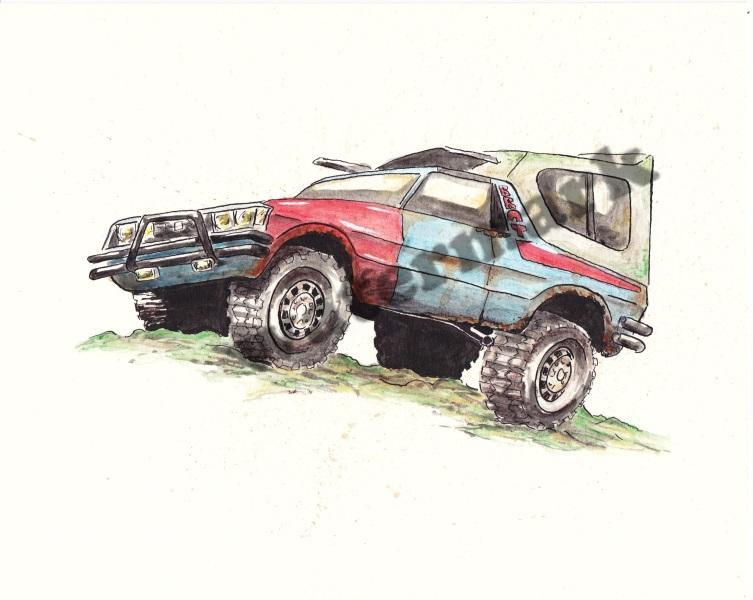
  1. I'm throwing this out here. I sadly don't own a Subaru (other than a Hot Wheels Brat). I've always loved cars but I'm coming to the conclusion I simple can not have all the cars I've ever drooled over. I mean, I'd love my own Brat, SVX, XT, or (ahem) Crosstrek but finances only allow so many things. I've taken to drawing and painting some of the vehicles. An 8" x 10" is a lot easier to store. This includes a Brat completed in the last couple months. If it's something you'd be interested in, check it out on my Etsy shop. It's listed for $50. I don't currently have prints on hand but that would be a lower priced option if I know it's something people would like. https://www.etsy.com/listing/577851422/subaru-brat-subaru-brat-original If you're interested, let me know! Thanks!

Account

Navigation

Search

Search

Configure browser push notifications

Chrome (Android)
  1. Tap the lock icon next to the address bar.
  2. Tap Permissions → Notifications.
  3. Adjust your preference.
Chrome (Desktop)
  1. Click the padlock icon in the address bar.
  2. Select Site settings.
  3. Find Notifications and adjust your preference.