Skip to content
View in the app

A better way to browse. Learn more.

Ultimate Subaru Message Board

A full-screen app on your home screen with push notifications, badges and more.

To install this app on iOS and iPadOS
  1. Tap the Share icon in Safari
  2. Scroll the menu and tap Add to Home Screen.
  3. Tap Add in the top-right corner.
To install this app on Android
  1. Tap the 3-dot menu (⋮) in the top-right corner of the browser.
  2. Tap Add to Home screen or Install app.
  3. Confirm by tapping Install.

Big Book Mark

Members
  • Joined

  • Last visited

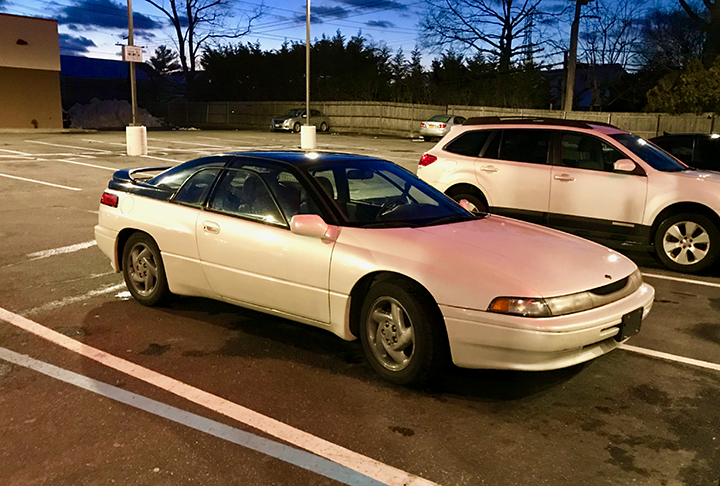
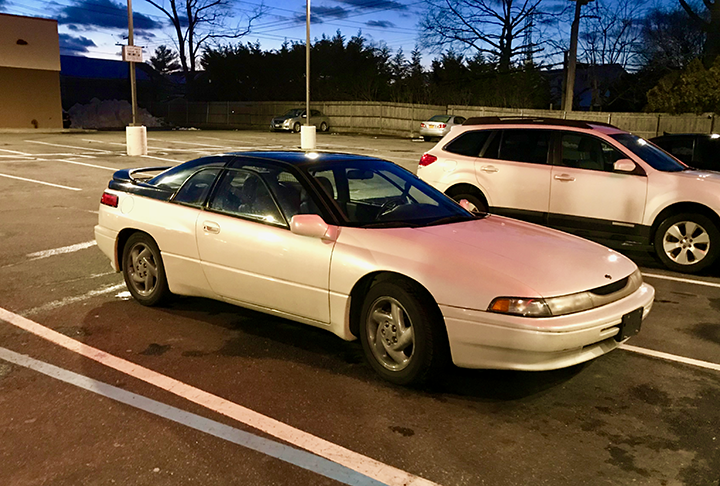
  1. Yeah, I know the 2 rears were mounted wrong. The tires are directional, so I have to get them remounted, can't just switch sides. But, believe me, that's way at the bottom of the list of things to do! I would never have imagined parts for this baby would be so incredibly difficult to find!
  2. Big Book Mark changed their profile photo
  3. Hi all. Bought a 1992 SVX, Pearl White in 1992. LOVED that car. Sold it in 1996 and have regretted it for the past 22 years. I was driving down a Vermont country road and BAM! There she was! No, not my actual love, but a beautiful 1992 Pearl White SVX with 100,000 miles, one owner. Paid $4,800 and am just as in love as I was 26 years ago! Parts are so hard to find, but it's a labor of love! Mark
Account

Navigation

Search

Search

Configure browser push notifications

Chrome (Android)
  1. Tap the lock icon next to the address bar.
  2. Tap Permissions → Notifications.
  3. Adjust your preference.
Chrome (Desktop)
  1. Click the padlock icon in the address bar.
  2. Select Site settings.
  3. Find Notifications and adjust your preference.
