Kitcarguy
Members
-
Joined
-
Last visited
-
Thanks!
-
Yeah im sure I can pull out the radiator and find some sort of marking on it, or take it to an "expert". Part of the fun with these things is figuring out what everything is lol
-
I think it will be easier to just put another radiator in it
-
Here is the thermostat housing and a few othersIt is called an Invader gt. Was built in the late 60s into the 70s. To be honest didn't really buy it for the body . Mainly because it had a solid chassis and the subi swap.Here are a few more pics of the car if anyone is interested .
.thumb.jpg.464d46693ba697915a4c542f1d7bf5e6.jpg)
.thumb.jpg.92488ca0c7e217a3bbc0b9b02285f80e.jpg) Cool. Thanks for the help.Interesting info. I will get some better pics of the engine later today. Maybe it will tell a bit more. I'm going to need exhaust gaskets and such so I am trying to narrow down the best I can what year /model it is ThanksI had a feeling it was not. The big question is what the hell is it from lol. Would be a lot easier finding a radiator cap than needing to replace the radiator because I can't find a cap. Are these engines pretty much the same from year to year? Because I have no clue what it originally came out of I do not really have a reference in regards to a year or model to get parts. ThanksHey everyone. I recently picked up an old VW based kitcar that is subaru powered. I figured out it is a ea82 but that's about it. It is missing the radiator cap but after trying 2 I still can't find one to fitfiNny ideas?I dont even know is its a subaru radiator. Anyway to tell? Also it has an awful exhaust leak. Any idea what the part number is for the gasket. This is my first subaru. What are some other things I should be looking out for? Thanks
Cool. Thanks for the help.Interesting info. I will get some better pics of the engine later today. Maybe it will tell a bit more. I'm going to need exhaust gaskets and such so I am trying to narrow down the best I can what year /model it is ThanksI had a feeling it was not. The big question is what the hell is it from lol. Would be a lot easier finding a radiator cap than needing to replace the radiator because I can't find a cap. Are these engines pretty much the same from year to year? Because I have no clue what it originally came out of I do not really have a reference in regards to a year or model to get parts. ThanksHey everyone. I recently picked up an old VW based kitcar that is subaru powered. I figured out it is a ea82 but that's about it. It is missing the radiator cap but after trying 2 I still can't find one to fitfiNny ideas?I dont even know is its a subaru radiator. Anyway to tell? Also it has an awful exhaust leak. Any idea what the part number is for the gasket. This is my first subaru. What are some other things I should be looking out for? Thanks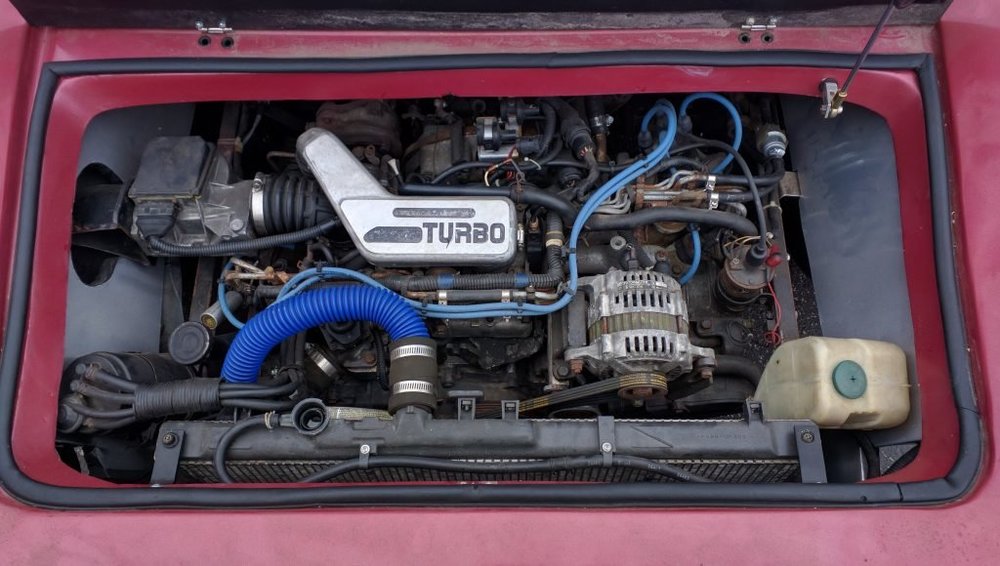
.jpg.f1896ac39236c490887e696c8bea424e.jpg)
.jpg.7d74632a317733ccbc6c5c9ad3304c7b.jpg)