Jsub
Members
-
Joined
-
Last visited
-
Jsub replied to Jsub's topic in 1990 to Present Legacy, Impreza, Outback, Forester, Baja, WRX&WrxSTI, SVXVery good information, I appreciate it! Thank you.
-
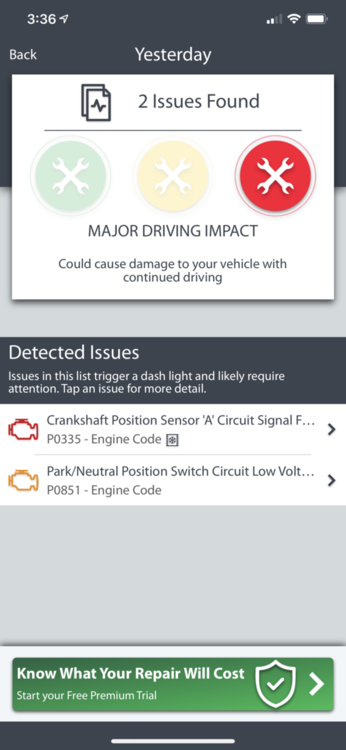
Jsub replied to Jsub's topic in 1990 to Present Legacy, Impreza, Outback, Forester, Baja, WRX&WrxSTI, SVXSo an update: i did put the car in Neutral (moved shifter side to side) it started.. it also shot these codes
-
Jsub replied to Jsub's topic in 1990 to Present Legacy, Impreza, Outback, Forester, Baja, WRX&WrxSTI, SVXOn the old battery I replaced like 5 months ago.. tons of fuzzy corrosion on mainly positive. Maybe bad positive post terminal?
-
Jsub replied to Jsub's topic in 1990 to Present Legacy, Impreza, Outback, Forester, Baja, WRX&WrxSTI, SVXJsub replied to Jsub's topic in 1990 to Present Legacy, Impreza, Outback, Forester, Baja, WRX&WrxSTI, SVXWhat would be clicking in or near glove box during multiple clicks when I turn it over?Jsub replied to Jsub's topic in 1990 to Present Legacy, Impreza, Outback, Forester, Baja, WRX&WrxSTI, SVXThere has been times when I’m driving the security alarm light is still flashing. With in the last 2 months only on occasion.Jsub replied to Jsub's topic in 1990 to Present Legacy, Impreza, Outback, Forester, Baja, WRX&WrxSTI, SVXThese cables look like dinosaurs honesty...the crazy thing is I used to be able to wiggle the shifter in park. And it would go from no crank no start to starting. But now no such luck.Jsub replied to Jsub's topic in 1990 to Present Legacy, Impreza, Outback, Forester, Baja, WRX&WrxSTI, SVXIs that a new starter.. or maybe an easy fix?Ok I am stumped.. I have a new Battery. I went out for a couple of hours came back home then went to start the car a few hours later .. nothing. Checked fuses, tapped the starter, lights are bright not dimming, radio works, blower motor fine. I turn the ignition to turn over: I hear multiple clicks ( like a wood pecker) also hear clicking in glove box. I tried turn car over in different gears too... Nope. So I left key on after I tried turning over all items on dash cluster are on I put shifter in reverse ( key still on) constant buzz under hood until I put back in park. Then it buzzing stops. Put back in reverse buzzing stars again. Any ideas ? Thank you in advance for any tips.