MARKMAN99
Members
-
Joined
-
Last visited
-
MARKMAN99 replied to MARKMAN99's topic in 1990 to Present Legacy, Impreza, Outback, Forester, Baja, WRX&WrxSTI, SVXThanks for your comment. So it sounds like you would recommend: oil + filter change, air filter change, brake + CVT + diff fluids, spark plugs?
-
MARKMAN99 replied to MARKMAN99's topic in 1990 to Present Legacy, Impreza, Outback, Forester, Baja, WRX&WrxSTI, SVXThanks got it Do you have any tips for finding a good Subaru specialist independent shop? I've tried just searching google for "subaru service" and found a few
-
MARKMAN99 replied to MARKMAN99's topic in 1990 to Present Legacy, Impreza, Outback, Forester, Baja, WRX&WrxSTI, SVXThanks for the advice. I'm a bit confused though - you said I need brake fluid but later say I don't need to change the brake fluid at 60k? Any advice for finding a Subaru specialist shop?
-
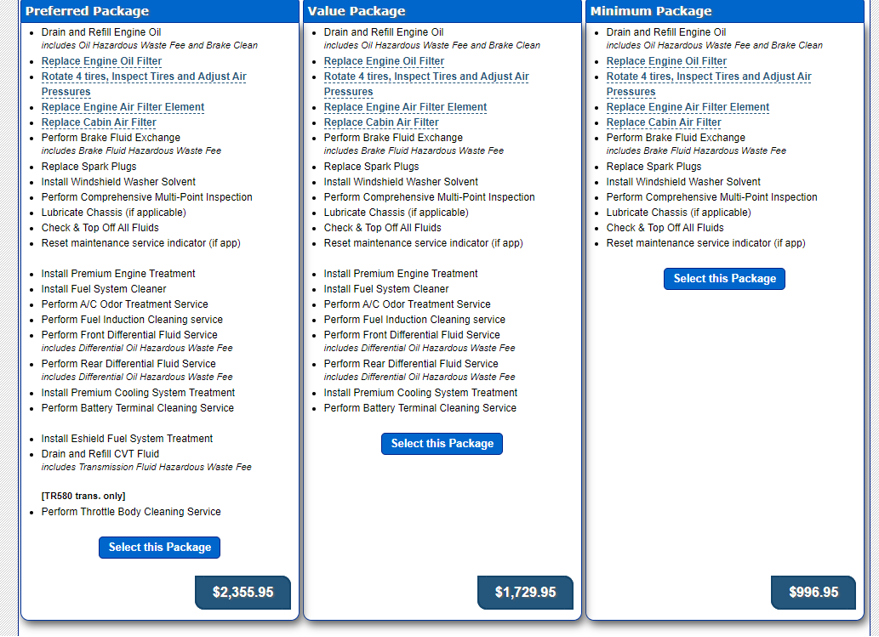
Hi all, Stats: 2013 Sub Impreza 2.0L base - approx 61k miles My local Sub dealership quoted me between $1000-2300 for 60k service package (see attached - recommended $1700 mid package due to 'harsh' driving conditions). The Sub manual only says to "inspect and replace" most items except for the oil change but the dealership service guy said in his experience it's better to flush the key fluids (transmission, diff, etc.) at this point. Questions: 1) Do you all feel 60k service package is a good idea? How much is a good price to pay? 2) Should I do the service at the dealership or would an independent shop be OK? 3) Are there any good independent shops with Subaru certified/trained mechanics in the Bay Area CA? Thank you for any advice!