FlightRisk
Members
-
Joined
-
Last visited
Everything posted by FlightRisk
-
FlightRisk replied to FlightRisk's topic in 1990 to Present Legacy, Impreza, Outback, Forester, Baja, WRX&WrxSTI, SVXThank you both that helps a lot.
-
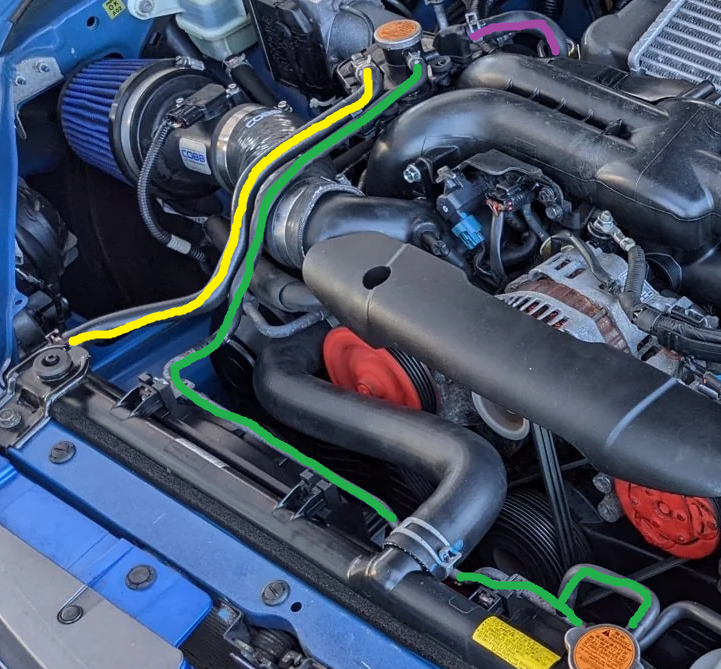
FlightRisk replied to FlightRisk's topic in 1990 to Present Legacy, Impreza, Outback, Forester, Baja, WRX&WrxSTI, SVXThanks that helps. I misunderstood the flow direction on the turbo line (purple). I thought it flowed to the turbo from the aux tank. So where is the other turbo line connected, somewhere else on the cylinder head? Now I’m having trouble understanding why coolant would flow from the turbo to that tank if the tank has a line directly to the head (positive flow) when the thermostat is closed or does it just not flow through the turbo until the thermostat opens?
-
Without getting too far into the weeds, I'm trying to replicate the WRX aux tank design into a car that doesn't have one. From what I could find on my own, the purple hose goes to the turbo, green goes to the overflow tank, yellow goes to the radiator, and there's another on the bottom of the aux tank that goes to the cylinder head that you can't see in this photo. My question is what is the purpose of the yellow hose? I'm thinking that coolant will flow from the head to the radiator both through the upper coolant hose and the yellow hose although I don't see why it's necessary for some of it to flow through the aux tank just to go to the radiator anyway so I must be missing something.. TIA.