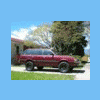
November 6, 201114 yr Hello again to all the Soob nuts out there!!! I had to take a long break from the hobby and missed it. I'm back on the board after 5 years and am on the hunt for another 80's wagon. Can't wait to aquire a new project and get back in the swing of things. Looks like a bit has changed, and I can't wait to dig in and see all the cool stuff you guys have been dreaming up over the last few years. I'm still in CO, so if there are any remaining members of the CO Subaru community please contact me. I'd love to catch up and/or meet new enthusiasts! It's good to be back! Toby
November 8, 201114 yr Glad to see you around again. What model are you seeking exactly? Can always watch for them up here.
November 9, 201114 yr Author I'm interested in another EA82 wagon. But would be open to a hatch or brat of similar years. Just want another Soob to have fun with! I've missed the simplicity of it all. I've missed this kind of comraderie from the cool people on the board as well. Thanks for looking out Shawn!

Please sign in to comment
You will be able to leave a comment after signing in
Sign In Now