November 30, 201114 yr alright so i just got back from the gas station, and when i got back i noticed steam from under the hood, im not overheated according to the temp guage, heater blows fine, but steam is coming at a slow rate through the rad. cap, its brand new! any suggestion. a friend had said mayby the rad. cap is doing its job, and its the t-stat. also noticed the fans dont kick on on there own?
November 30, 201114 yr Maybe the cap is not seated properly, or maybe the hole it sits in is slightly bent causing it to not seal. look for any dryrotted or cracked hoses. mae sure the radiator does not have any cracks or pinhole leaks. dont forget to tell us the year and model of your subaru!
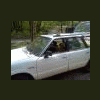
November 30, 201114 yr Author ohh i appologize. she's a 1983 subaru gl wagon 4wd. 1.8. i did some tinkering today and ended up putting the old cap back on, theres a small difference between the size of the seals under the caps. no noticeable noise now unles you really put your ear up to it after a long run, so i assume that was the problem, think i got bigger issues though. whoever owned it before me, jerry-rigged a toggle switch to the hot on the radiator fan wire. when i found infact the temp sensor is the switch for that connection, and its the ground thats interupted. but i found two temp sensors on the radiator passenger, side, one is at the lower end towards the drain plug, the other towardsthe top on the thin side. thats the one thats connected and im assuming they jumped the hot because the temp sensory's faulty. is that possible? which temp sensor should i be hooked up to.

Please sign in to comment
You will be able to leave a comment after signing in
Sign In Now