Skip to content
View in the app

A better way to browse. Learn more.

Ultimate Subaru Message Board

A full-screen app on your home screen with push notifications, badges and more.

To install this app on iOS and iPadOS
  1. Tap the Share icon in Safari
  2. Scroll the menu and tap Add to Home Screen.
  3. Tap Add in the top-right corner.
To install this app on Android
  1. Tap the 3-dot menu (⋮) in the top-right corner of the browser.
  2. Tap Add to Home screen or Install app.
  3. Confirm by tapping Install.

New Washington Subaru Owner!

Featured Replies

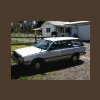
Hey guys. I'm pretty much new here. I own an 1986 Subaru Grand Luxury.

374649_2910370882355_1353101897_4794462_1192545046_n.jpg

The engine just got put back together so hopefully I'll be driving it soon here. it's got 350k miles on it and the heads were cracked, but hopefully it'll run nice!

405733_234454746638432_130650177018890_526496_5457659_n.jpg

Nothin' fancy, just a 1.8l, but it'll do! It's only had one owner, with only a middle man who sold it to me when the first owner gave it to him. Anyways my hope and dreams are make just a few additions: Brush gaurd (exactly like suby rebel's), roof rack+basket, 4 inch, SJR Lift, 27 All-terrains, weber carbs, and a nice sound system. Maybe even a general lee horn for kicks and giggles...:burnout:

Edited by Ruby Sue

That looks clean!


Welcome to USMB. You will find everything you need here!


Make sure to read the FAQs and search plenty :)


I own an 86 GL, and I must say hes clean, but not that clean!

Please sign in to comment

You will be able to leave a comment after signing in

Sign In Now

Account

Navigation

Search

Search

Configure browser push notifications

Chrome (Android)
  1. Tap the lock icon next to the address bar.
  2. Tap Permissions → Notifications.
  3. Adjust your preference.
Chrome (Desktop)
  1. Click the padlock icon in the address bar.
  2. Select Site settings.
  3. Find Notifications and adjust your preference.