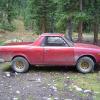
April 10, 201213 yr Ok, I have a '79 wagon that has been sitting in a garage for 10 years or so now. It has a running EA71. I've used some parts from the car for my '78 Brat, though it is mostly complete. I have always wanted to get this car on the road again. I'm considering a full motor/tranny swap. Maybe EJ22 or EJ205. Possibly suspension/brakes as well. Has anyone done this? I'm in the Denver area. It's just a thought at this time but it would be sweet. Maybe I'm crazy...
April 10, 201213 yr Author I've been an occasional poster to the USMB since '04. I will put some pics up as soon as I dig it out of the garage. It's kind of buried at the moment..
April 10, 201213 yr Author I see you have a '78 Brat as well.. I swapped a EA 81 with Weber carb and a d/r 5spd tranny into my '78
April 10, 201213 yr I see you have a '78 Brat as well.. I swapped a EA 81 with Weber carb and a d/r 5spd tranny into my '78 Oh well welcome back then! haa. At least you want to restore it and get it running! I personally am going to hopefully be putting a 2.2T in my 78. There are some other posts i think it was twin turbo put into a older brat. It is possible, I'm guessing or just make it work.

Please sign in to comment
You will be able to leave a comment after signing in
Sign In Now