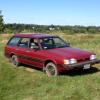
June 4, 201213 yr Hey guys, Been driving an old MB diesel for the past four years. Did tons of work on it as well as some other cars, but now I'm gettin' a 1989 GL wagon. 5-speed with the on-demand 4x4, 1.8 NA engine, power everything. 95,000 original miles, been sitting for the past six months, but got running and drove around a little this weekend. Runs like a champ. Everything works, except the windows seem to have some gremlins in them. Some rot, but nothing compared to my old MB. I've got a four-hour drive from NY to MA to get it home, so first off, is there anything I outta get done before I make this drive? When I get home, I plan on replacing all the fluids, checking the timing belts and generally cleaning and tuning it up.
June 5, 201213 yr At 95K if there isn't any head gasket issue (unlikely at that low), I bet you will be fine. Just bring those fluids along for the drive home and allow extra time.

Please sign in to comment
You will be able to leave a comment after signing in
Sign In Now