Skip to content
View in the app

A better way to browse. Learn more.

Ultimate Subaru Message Board

A full-screen app on your home screen with push notifications, badges and more.

To install this app on iOS and iPadOS
  1. Tap the Share icon in Safari
  2. Scroll the menu and tap Add to Home Screen.
  3. Tap Add in the top-right corner.
To install this app on Android
  1. Tap the 3-dot menu (⋮) in the top-right corner of the browser.
  2. Tap Add to Home screen or Install app.
  3. Confirm by tapping Install.

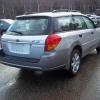
Back in a Subaru.. =) 06 Outback 2.5i wagon

Featured Replies

Well after going from my 97 Outback into a 98 Jeep Wrangler for about 1.5yrs..It was time to return to my roots..and into a Subaru.Already gave her the name of Silvia (just popped into my head while laying down).


She has just over 109k and sport shift auto trans..


Major difference from the Jeep..

post-6265-0-59178400-1374731894_thumb.jpg

Edited by subie94

Please sign in to comment

You will be able to leave a comment after signing in

Sign In Now

Account

Navigation

Search

Search

Configure browser push notifications

Chrome (Android)
  1. Tap the lock icon next to the address bar.
  2. Tap Permissions → Notifications.
  3. Adjust your preference.
Chrome (Desktop)
  1. Click the padlock icon in the address bar.
  2. Select Site settings.
  3. Find Notifications and adjust your preference.