September 27, 201312 yr hello from Ontario, Canada. I've had a few Subarus over the years. just picked up a 2000 outback limited with a blown timing belt for a song so time to get dirty again! Edited September 28, 201312 yr by nakedandfam0us
September 28, 201312 yr Great car. My wife drives a 2000 outback that has served us very well for years and many MANY miles. Post up some pictures when you get a chance. Welcome to the board!
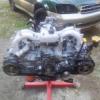
September 28, 201312 yr Author Thanks for the welcome Car seems straight and clean so I figured for 600 bucks with 2 sets tires/rims, one being brand new goodyear eagle directional snow tires, other yokos on the stock aluminums, it was worth the gamble. The guy who owned it cooked the timing belt, replaced belt, and attempted to start it. nice eh?! so whatever, i have a running ej251 out of an 02 TS that is going in for now. Planning a winter project rebuild of the original block. pulled heads first to check out the carnage, which was bad enough to warrant the motor swap. I posted a couple pics in the proper thread of the car and some bent valve awesomeness lol. I got the motor out today and parts ordered... i posted a question in the proper forum about some electrical questions. Glad to be a part of the forum!
September 29, 201312 yr Shoot. $600. is a bargain. The EJ25 is a solid motor. Prone to head gasket failure so don't let it run hot. But we're at 333,000 on ours.

Please sign in to comment
You will be able to leave a comment after signing in
Sign In Now