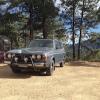
October 2, 201312 yr So I've taken over this project from noblesablepuma. Guy's too busy so I bought it off of him. Here's his build thread http://www.ultimatesubaru.org/forum/topic/117202-1978-4x4-wagon-build-thread/ I'm definitely a noob as they say, but I'm excited to start on this, and I've got you all to answer my questions right? I already have a few... Thanks for having me. -J
October 2, 201312 yr what fantastic car! Glad you're here, glad she's in good hands, and looking forward to seeing what you do with her.
October 2, 201312 yr NICE WAGON! You're in the right place as a noob though. Helpful people on this board, and these cars are super easy to learn on and work on. Welcome!
October 2, 201312 yr Author Thanks very much. I'm gonna start with a question though it might not be the right place.... What size is the fuel return line...
October 4, 201312 yr Author Posted in the wrong thread.... oops Edited October 4, 201312 yr by julianco

Please sign in to comment
You will be able to leave a comment after signing in
Sign In Now