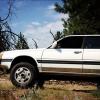
November 14, 201312 yr Hi all, I have owned a Subaru for a long time (87 wagon with a 4" lift) not to familiar with the newer Subaru's. I recently picked up a 00 Outback wagon from a guy that was trying to swap a 04 ej205 JDM WRX motor into it. It would be a sweet ride but the problem he ran into is the 04 USDM WRX harness won't plug into the JDM motor. So my question is, has anyone had success with this type of swap before? My thought was to install a US WRX intake manifold along with the cam pulleys, crank pulley, and all the necessary sensors to match up with the US WRX ecu and wiring. Any thoughts or ideas are appreciated! Thanks 00 Outback Wagon 04 WRX ej205 JDM motor 04 USDM WRX complete wiring harness + ecu 5 speed AWD
November 14, 201312 yr If it's a legit 04 JDM 205, unload it for a USDM 205. It will have avcs and higher compression, and be a huge pain in the keester.That said, I know you can block off the avcs in the 2.5 heads to run them on a 2.0 ecu, and if you're okay with having to get the car dyno/road tuned, then you might be able to make it work by swapping the engine wiring for what plugs into your bulk harness.Pics will help, too.
November 16, 201312 yr Author Alright, sounds like ill be on the search for a usdm wrx. Thanks for the help there.

Please sign in to comment
You will be able to leave a comment after signing in
Sign In Now