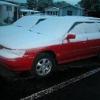
December 5, 201312 yr Today I totaled my brothers 91 Loyale. I doesn't start. the cops that did the accident report were asking if I new where the fuel reset button was. I told them I didn't think it had one. Does it have one and if so, where is it.
December 5, 201312 yr To the best of my knowledge, no there is no reset button. In what way was it totalled? Where it was damaged could indicate why it won't start. Otherwise, look for what is missing: Compression, spark, fuel.
December 5, 201312 yr Author It was hit on the front right corner and the car was spun around and hit again between the rear right tire and the gas door.
December 5, 201312 yr Could have severed the connection to to fuel pump. The wiring harness for the pump runs in that quadrant and the pump itself is located infront of the rear tire. Connecting the green connectors in the engine bay will cycle the fuel pump on and off when you turn the key to the on position.
December 5, 201312 yr There's no fuel cut switch. I'll bet the timing belt got snapped or some wiring for the ECU/fuel system got damaged.
December 5, 201312 yr Author I didn't think it had one, when the weather warms up we'll try to get it running. My brother wants the motor for his other Loyale with 300K miles. This one has 112K.

Please sign in to comment
You will be able to leave a comment after signing in
Sign In Now