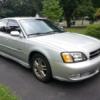
August 20, 201411 yr Hi everyone, I bought this 2002 Subaru Legacy Gt Limited about 5 months ago. it has 134,000 miles on it. I only just passed my drivers test about 6 months ago at the age of 22. The reason I got it so late is because i had a fear of driving. My moms Nissan Cube increased my fears because i really hated the way the car handled with the steering and gas peddle feel. because it had a cvt tras i felt there was a delay when i push the peddle down to when the car started accelerating. also the steering felt like it was not connected to the tires. I just did not feel like i was in control with that car. With driving this car over the last 5 months i have now come to love driving. the steering and handling is awesome and the car actually goes when i hit the gas. its got some really good acceleration. I hate sun glare so the tinted windows are a big help. Although probably not legal. They were tinted when i bought it. One thing i dont like is the very bumpy ride. a small bump is like a huge pot hole. I feel everything. some bumps are bone jarring. its kinda like riding in a school bus. the steering is also a bit stiff. There are a few parts i need to replace or fix my struts and tires. Im going to buy new rims as mine are really faded(they were gold). I need some paint and dent work done as well as my spoiler fixed. Edited August 21, 201411 yr by Alexgt

Please sign in to comment
You will be able to leave a comment after signing in
Sign In Now