Skip to content
View in the app

A better way to browse. Learn more.

Ultimate Subaru Message Board

A full-screen app on your home screen with push notifications, badges and more.

To install this app on iOS and iPadOS
  1. Tap the Share icon in Safari
  2. Scroll the menu and tap Add to Home Screen.
  3. Tap Add in the top-right corner.
To install this app on Android
  1. Tap the 3-dot menu (⋮) in the top-right corner of the browser.
  2. Tap Add to Home screen or Install app.
  3. Confirm by tapping Install.

Hello Subaru friends

Featured Replies

Hello everybody, I am a Subaru fan living in Pisa, Italy. My passion for Subaru started when I went to the 2000 Sanremo WRC race, the Impreza WRC was just amazing.

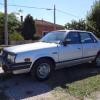
Since then I managed to buy three Subaru cars, a 1999 Impreza type-r, a 2004 Impreza WRX Wagon (with PPP kit) and a 1984 Leone AB5. Amazing cars!

Hope to exchange lots of usefull information on this forum.

Cheers,

Marcos

post-48300-0-90160600-1422459025_thumb.jpg

Welcome alastor555.  Wow--you went "All In!"  Nice looking lineup.

Please sign in to comment

You will be able to leave a comment after signing in

Sign In Now

Account

Navigation

Search

Search

Configure browser push notifications

Chrome (Android)
  1. Tap the lock icon next to the address bar.
  2. Tap Permissions → Notifications.
  3. Adjust your preference.
Chrome (Desktop)
  1. Click the padlock icon in the address bar.
  2. Select Site settings.
  3. Find Notifications and adjust your preference.