Skip to content
View in the app

A better way to browse. Learn more.

Ultimate Subaru Message Board

A full-screen app on your home screen with push notifications, badges and more.

To install this app on iOS and iPadOS
  1. Tap the Share icon in Safari
  2. Scroll the menu and tap Add to Home Screen.
  3. Tap Add in the top-right corner.
To install this app on Android
  1. Tap the 3-dot menu (⋮) in the top-right corner of the browser.
  2. Tap Add to Home screen or Install app.
  3. Confirm by tapping Install.

did the front breaks today.

Featured Replies

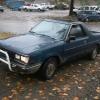
Well today I spent the day doing the front breaks, I snatched a spair set of rooters austin had, took them in and got em turned. Bought some new break pads... descovered my calipers were frozen, took some spare calipers austin had from a hatch. while I was at it, I replaced my passenger side cv axle cause it clicked alot, outer boot was torn. Got it all together, blead the hill holder, master cylender, and front breaks, next step, is to inspect the rears and bleed the entire break system at once... But the car locks all 4 wheels all at the same time now. I feel I had a very productive night:cool: my passenger side rear drum is making a horrible grinding noise.... So they're the next thing to get done.

Please sign in to comment

You will be able to leave a comment after signing in

Sign In Now

Account

Navigation

Search

Search

Configure browser push notifications

Chrome (Android)
  1. Tap the lock icon next to the address bar.
  2. Tap Permissions → Notifications.
  3. Adjust your preference.
Chrome (Desktop)
  1. Click the padlock icon in the address bar.
  2. Select Site settings.
  3. Find Notifications and adjust your preference.