November 19, 201510 yr The dust is settling some now from my move (back) to MN. I'm starting to think about early summer when college kid will be home and I'll likely need another vehicle. Time to look for another wagon! I've been to the three salvage yards around the Twin Cities looking for parts for other vehicles. Good to see a nice selection of Legacy/Outbacks. I even saw a nice EA81 wagon (tan) with a decent interior. You don't see many of those in the yards or rolling on the streets around here in saltesota. I'll be diving into a head gasket on my 01 Civic in the next couple of weeks, so that should give me some nice warm up to some EJ25 work that I'll be looking for as I search for a gen 1 Outback. Being back in Subaru country feels good.
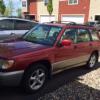
May 14, 20169 yr Author OK, so the search took a longer path, but I'm comfortably back on the Scooby family. "New" 01 Forester S with only 153k. Pretty sweet ride. Stopped by the dealer on the way home to get some keys made and found out from the service department (they sold it to the guy I bought it from) replaced the HGs in 2013 at 109k as they were leaking. It's good to be back in the fold.

Please sign in to comment
You will be able to leave a comment after signing in
Sign In Now