April 6, 201610 yr Hey guys! My name is Ana, I just got a 99 Legacy Outback. I have been into DSM's for about 9 years now, but I know NOTHING about this Subaru other than I love to drive it. I got it from my grandmother, she decided she wanted a Forester. Shes got 178k, timing was done 20k ago and already got the head gaskets redone. Just found out my rear main is leaking and that it is common. I think she has a EJ25D? Not sure about Auto trans code.Glad to have found this forum, hoping to gain some knowledge so I can work on her like I work on my DSM. Thanks guys!
April 6, 201610 yr Welcome aboard, Ana! You're gonna' love your Subaru--and you're gonna' love the USMB. Good folks here and great information. But you've got my curiosity up! What's a DSM?
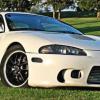
April 15, 201610 yr Author Thanks! A DSM is Diamond Star Motors. Crysler & Mitsubishi merged in the late 80's and made the Eclipse, Laser and Eagle Talon. I own a 99 Mitsubishi Eclipse GSX, AWD Turbo. "slightly" modified I have always had a thing for Subies and now I finally own one, just have no idea where anything is! https://en.wikipedia.org/wiki/Diamond-Star_Motors Edited April 15, 201610 yr by DSMSubieGirl
Please sign in to comment
You will be able to leave a comment after signing in
Sign In Now