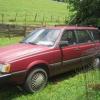
August 15, 20169 yr Hey guys! Got a 1994 Subaru Loyale I recently picked up. It's got a EA82 in there and I think a 4AT. Also scored a spare motor I plan on rebuilding! And then rebuilding the other one as well. Looking for a few parts but it's all coming together. I have plans to eventually do a EJ swap.
August 15, 20169 yr Fat Cat Denial of Service? Best name ever. Your car should have the 3at. If you do an ej swap, throw a manual in there at the same time.
August 16, 20169 yr Author Heck yeah. Planned on it. This 3at is working as it though. Can't seem to fix it if it ain't broke. On the hunt for a Flexplate and torque converter though!
August 16, 20169 yr Author Heck yeah. Planned on it. This 3at is working as it though. Can't seem to fix it if it ain't broke. On the hunt for a Flexplate and torque converter though!

Please sign in to comment
You will be able to leave a comment after signing in
Sign In Now