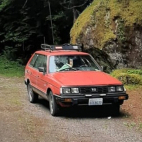
January 6, 20206 yr I've been a member on the forums for around a year now and this is going to be my first non question post. I figured it's time to start giving back now that it's been around a year. I will continue to post a few entries until we are up to date with my mods.. This is my 84 4x4 GL I received from my grandfather as a gift. When I received it a year ago its clutch was warn to the rivets and basically everything was moldy. These were the only KNOWN issues lol. As you can see she looks like she was in a lake. But she cleaned up nice. Next step was towing her to my place and learning how to work on my first subie. (Photos as of Feb/Mar '19) Edited January 6, 20206 yr by fuji4x4
January 6, 20206 yr Author Also I would like to add if anyone has an Instagram I keep a build page on there to log my photos. Feel free to follow me at fuji4x4

Please sign in to comment
You will be able to leave a comment after signing in
Sign In Now