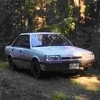
September 16, 20214 yr Hello, I've been lurking the forum for a few months, but decided to join to get some advice on repairs. I bought my 1991 Subaru Loyale a few months ago and have driven it across Canada. Pros: good on gas, small enough to drive anywhere, easy to work on, only 160000km on it, looks cool. Cons: no power up hills, smelly exhaust, bottoms out when fully packed, Tick of Death comes and goes. Currently I'm having intermittent starting issues - I will make a post with more details. Edited September 16, 20214 yr by SubaruJon Add photo
September 26, 20214 yr Possess an '93 complete engine assembly, with 49 K miles. And full new gasket set with ancillary parts. Belts, hoses, thermostat, etc. Willing to crate & ship, if you set it up, and are so inclined. Have a lot of small metal parts, also, that are easily shipped. Good luck with your new car. Edited September 26, 20214 yr by newmexguy

Please sign in to comment
You will be able to leave a comment after signing in
Sign In Now