Skip to content
View in the app

A better way to browse. Learn more.

Ultimate Subaru Message Board

A full-screen app on your home screen with push notifications, badges and more.

To install this app on iOS and iPadOS
  1. Tap the Share icon in Safari
  2. Scroll the menu and tap Add to Home Screen.
  3. Tap Add in the top-right corner.
To install this app on Android
  1. Tap the 3-dot menu (⋮) in the top-right corner of the browser.
  2. Tap Add to Home screen or Install app.
  3. Confirm by tapping Install.

suby in Petersen's 4wheel & offroad

Featured Replies

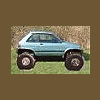
Hey we finally got a subaru in a big magazine. In the October edition of Petersen's 4wheel & Offroad there is a suby whith duals going thru the Bonners ferry mud pit.I had heard of this from a sheriffs officer whom was telling of the Police vehicle who also went thru the same pit. Now I'm sorry I didn't make the drive to see that event. Now we just need to get a feature story on one of our own offroad suby's.

It figures that I just let my subscription run out.

I dont suppose you could scan it and put it up?

I read in one of thier issues (maybe 2 or three years ago) that they reviewed a 4WD wagon (maybe a 1979). It was a look back at what they had done over the past 25 yrs. I treid emailing the editor to get it, but no response.

-Jack

ya could somebody scan it cause I let my subscription run out too

Please sign in to comment

You will be able to leave a comment after signing in

Sign In Now

Account

Navigation

Search

Search

Configure browser push notifications

Chrome (Android)
  1. Tap the lock icon next to the address bar.
  2. Tap Permissions → Notifications.
  3. Adjust your preference.
Chrome (Desktop)
  1. Click the padlock icon in the address bar.
  2. Select Site settings.
  3. Find Notifications and adjust your preference.