Tlovett
Members
-
Joined
-
Last visited
-
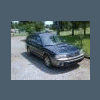
It's a 1998 Legacy Outback wagon, AWD w/2.5, auto trans. I put a pic of it up as my avatar!! What kind do you have?
-
I've recently did and had done quite a bit of work to my Subaru...new tires, lower front passenger ball joint, new knock sensor, new plugs(awhich was lmost a disaster!!!), new valve cover gaskets. I'm waiting on the Clarion CZ501 head unit and Kenwood speakers to arrive and then I'm installing them with a JL Audio JX360/2 amp and two JL 12" subs in a ported box. I also bought a rear cargo cover on eBay yesterday and it should be here by the end of the week. I'm thinking about tinting the windows also. I do have a problem with my main cooling and sub fan...previous owner cut the wires for some reason. Need to figure out exactly what's up with that and getr them fixed, replace front rotors, and then I believe it will be like new again!
-
Got my Subaru from my father...and I'm quickly growing tolove it as much as he does. Great little wagon!!!!