Skip to content
View in the app

A better way to browse. Learn more.

Ultimate Subaru Message Board

A full-screen app on your home screen with push notifications, badges and more.

To install this app on iOS and iPadOS
  1. Tap the Share icon in Safari
  2. Scroll the menu and tap Add to Home Screen.
  3. Tap Add in the top-right corner.
To install this app on Android
  1. Tap the 3-dot menu (⋮) in the top-right corner of the browser.
  2. Tap Add to Home screen or Install app.
  3. Confirm by tapping Install.

jjpeck

Members
  • Joined

  • Last visited

  1. Awesome! Do you have any more pictures of it? What is te seec-t engine?
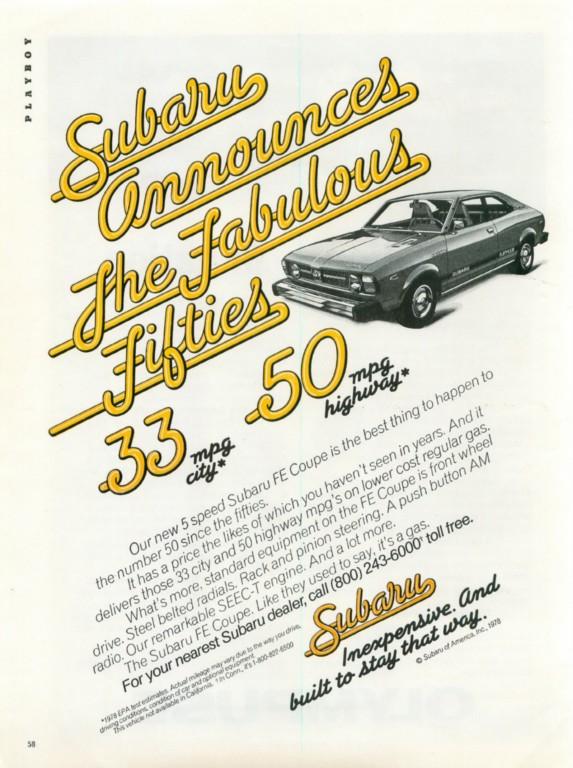
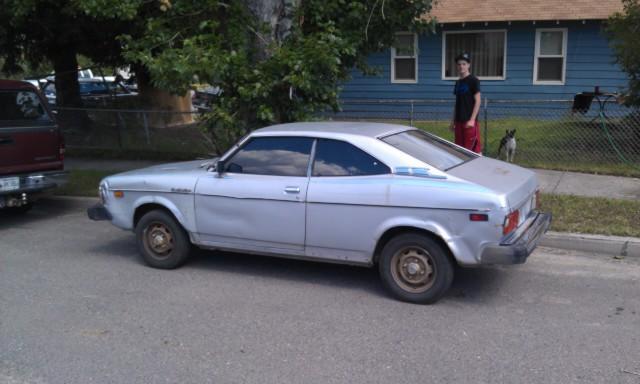
  2. I came across a funky little soobie that I did not know existed; the 1979 Subaru FE. This car is a manual 5spd front wheel drive car. It gets around 50mpg on the hwy! The rarity of this car is unbelievable...(Just try researching on google) I don't know much about subarus, but I knew this one was special. Check out how short the window gap is! If anyone knows ANYTHING about this type of car, please enlighten me! I don't know much about restoration, so I just listed it on ebay 7/30/14. Pretty cool car, but I don't have the means to restore it . Please let me know if you have any history on these awesome little cars!
Account

Navigation

Search

Search

Configure browser push notifications

Chrome (Android)
  1. Tap the lock icon next to the address bar.
  2. Tap Permissions → Notifications.
  3. Adjust your preference.
Chrome (Desktop)
  1. Click the padlock icon in the address bar.
  2. Select Site settings.
  3. Find Notifications and adjust your preference.