Jeffk
Members
-
Joined
-
Last visited
Everything posted by Jeffk
-
My latch switch is sporatic on the drivers side but works ok with a screwdriver. Anyone had one of theswe out and adjusted it? Any links to subaru junkyards if I can't adjust it? thanks
-
Jeffk replied to Jeffk's topic in 1990 to Present Legacy, Impreza, Outback, Forester, Baja, WRX&WrxSTI, SVXTried that button and tried 'jumping" the solenoid and neither worked. Must be the tumblers? thanks!
-
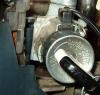
Jeffk replied to Jeffk's topic in 1990 to Present Legacy, Impreza, Outback, Forester, Baja, WRX&WrxSTI, SVXI can't find a button or a rod to push back but I also havent removed the bottom trim as I think the steering wheel needs to be removed. I think that solenoid is on top of the key . I will try to attach pic. Can you tell me if that is it? thanks!
-
Hi all, I just bought this real clean Legacy but the key stopped working. It wont come out at all. I have put it in park 100 times and jiggled the steering wheel etc etc. Everthing other than attempted removal works great and the guy before had no issues with the key. there is a small solenoid on top of the ignition tunnel but I can't figure out how to remove it. I ordered a new lock but I am concerned its the solenoid. Anyone know how to remove this? Also, if I have to replace the lock do I need a right angle drill to drill those sheared bolts off or is there some trick to tilting the steering column down enough to use a regular drill? thanks!