Skip to content
View in the app

A better way to browse. Learn more.

Ultimate Subaru Message Board

A full-screen app on your home screen with push notifications, badges and more.

To install this app on iOS and iPadOS
  1. Tap the Share icon in Safari
  2. Scroll the menu and tap Add to Home Screen.
  3. Tap Add in the top-right corner.
To install this app on Android
  1. Tap the 3-dot menu (⋮) in the top-right corner of the browser.
  2. Tap Add to Home screen or Install app.
  3. Confirm by tapping Install.

superu

Members
  • Joined

  • Last visited

Everything posted by superu

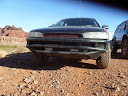
  1. I've got a 95 legacy L that i swapped for 97-99 outback struts.. its a simple pull 'em of and bolt 'em on deal, instant 2-inch factory lift... it made my stock 185 14s look super-lame!! I was able to easliy fit 205x75 14s in the wheel well on the stock rim, which added another inch... so now my legacy's about 9.5 inches to the rear diff... have fun!
  2. Hey Jared, I'm a new poster to the USMB, but have been visiting for a year or so... I'm in Flag. It'd be cool to join to west coast stompers and go play now and then... -mark-

Account

Navigation

Search

Search

Configure browser push notifications

Chrome (Android)
  1. Tap the lock icon next to the address bar.
  2. Tap Permissions → Notifications.
  3. Adjust your preference.
Chrome (Desktop)
  1. Click the padlock icon in the address bar.
  2. Select Site settings.
  3. Find Notifications and adjust your preference.