Skip to content
View in the app

A better way to browse. Learn more.

Ultimate Subaru Message Board

A full-screen app on your home screen with push notifications, badges and more.

To install this app on iOS and iPadOS
  1. Tap the Share icon in Safari
  2. Scroll the menu and tap Add to Home Screen.
  3. Tap Add in the top-right corner.
To install this app on Android
  1. Tap the 3-dot menu (⋮) in the top-right corner of the browser.
  2. Tap Add to Home screen or Install app.
  3. Confirm by tapping Install.

rsf27

Members
  • Joined

  • Last visited

Everything posted by rsf27

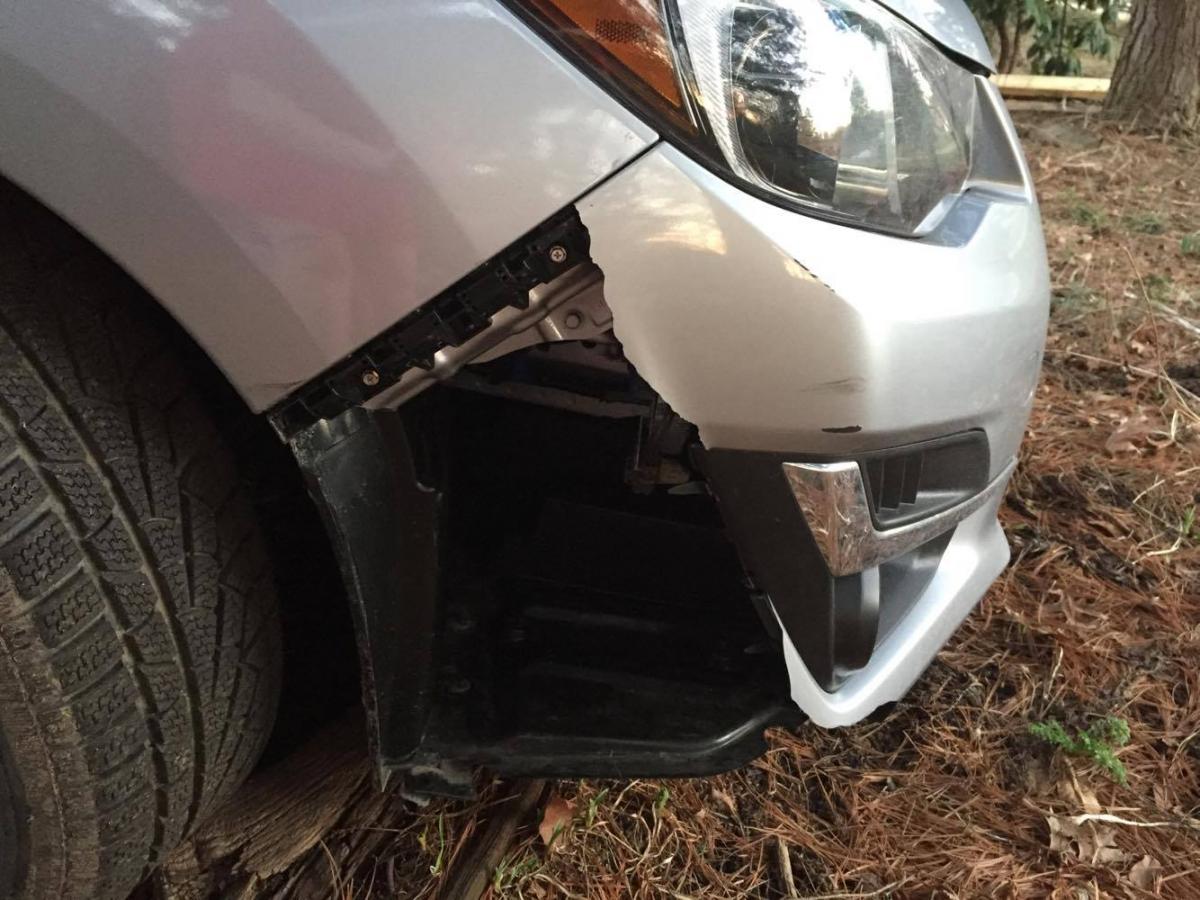
  1. Hello, Last week I drove my Impreza into a snowbank. I didn't realize how delicate the front bumper was (I won't make that mistake ever again). I got lucky in that the damage is just superficial; the headlights and everything all work. In the meantime, I've been getting quotes for around $1000 to replace the bumper. I was wondering how difficult it is for someone to replace the piece on their own. I am reasonably competent with a screwdriver and a wrench, but I am certainly no autobody man. What would you do in this situation? I have attached a photo to give you an idea of the damage. Regards, Rowan
Account

Navigation

Search

Search

Configure browser push notifications

Chrome (Android)
  1. Tap the lock icon next to the address bar.
  2. Tap Permissions → Notifications.
  3. Adjust your preference.
Chrome (Desktop)
  1. Click the padlock icon in the address bar.
  2. Select Site settings.
  3. Find Notifications and adjust your preference.