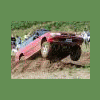
December 13, 200916 yr Gemini here with HighGuys Lifts, I'm new to the USMB but you should be familiar with our kits..HighGuys...and my modified 90 Legacy, Clifford. Here is a link to check out some of my videos: http://www.youtube.com/user/MrGLegacy I look forward to working with everyone here on the USMB, learning new things and making new creations....... I Also would like to thank GLoyale for all the help and knowledge of Subaru!!!!
December 15, 200916 yr oh man....i just moved away from corvallis. was living in philomath for the last 5 years and have been wanting to hook up with some offroading subby nuts for a long time. now i'm up by astoria. lookin to put a lift on my subby here this winter/spring.
December 17, 200916 yr I moved from Corvallis about a year and a half ago. Great place to live. We were there for 6 years, going to school. Love the area. I'd live there.

Please sign in to comment
You will be able to leave a comment after signing in
Sign In Now