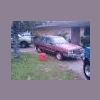
December 14, 200916 yr I have a Subaru sitting at my house and was wondering if I could get more money for it if i sold it as one or part it out. its a 84 with 84,000 miles on it. no carpet, rust in the rear wheel arches and rear rockers, window frame and 3 holes in the driver floor and one in the passenger floor the driver's door has a dent in it that prevents you from rolling the window down.
December 14, 200916 yr Depends how much time you have on your hands, and how much said time is worth. Over here in NZ, it'd probably be worth more to just sell the engine then the entire car. But then you've got to drop the engine (nicely too, no hack jobs or its not worth anything and you just get problems on your hands). Then theres everything else. Pulling the gearbox, shocks, etc. Can be a pain, especially if you only have limited time. Of course, its a good learning curve, and can be fun too, but if you just want the car gone, its easier to sell it.
December 14, 200916 yr 4wd with low range? If so, they're getting pretty rare -- used to be zillions of them around there, but the last few years it's getting hard to find them, so even beat up ones are fetching $400 to $500 if they run well. The 2wd ones you are better off trying to sell the engine than the car, because no one really wants them. Z

Please sign in to comment
You will be able to leave a comment after signing in
Sign In Now